MC App Knowledge

Contact us
Language:
FR French
IT Italian
ES Spanish
CN Chinese
TR Turkish
PL Polish
DE German
US English (US)
PT Portuguese
Home

    Please fill out the contact form below and we will reply as soon as possible.

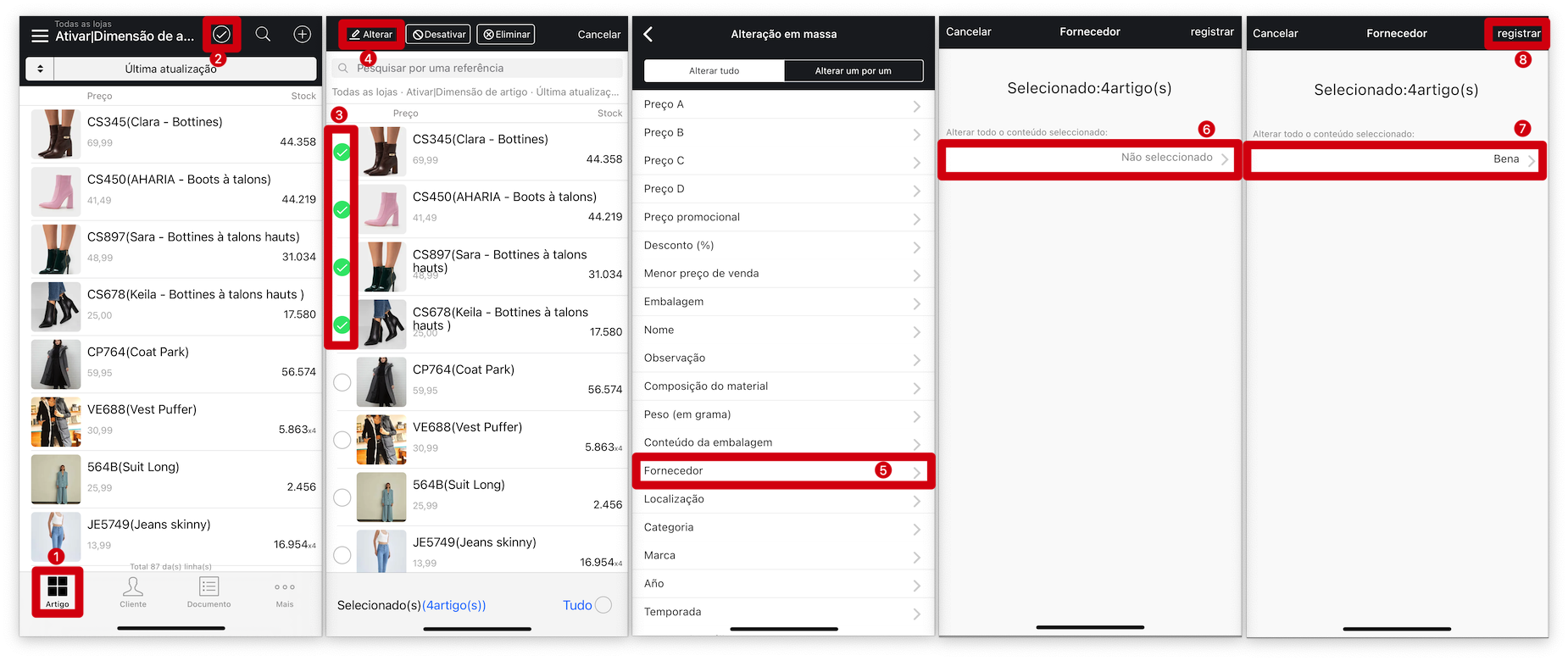
    How To Bulk Modify Products Information On MC Boss?

    Updated at May 16th, 2024

    In This Article:

      Q:How To Bulk Modify Products Information On MC Boss?

      A:MC Boss → Product → Bulk select items → Modify → Select product property to modify → ✔️

      • products property
      • bossproductmanagement
      • modify
      • bulk
      • discount
      • category
      • size
      • brand
      • season
      • name
      • category
      • purchase price
      • price
      • stock alert

      Was this article helpful?

      Related Articles

      How to Manage Product Sizes with Predefined Size Packs in MC Boss?

      Q: The products come in different sizes, are sold in packages, and the size ratio...

      How to customize the products displayed on My Fashion Wholesaler and the website on MS Manager?

      Q: How to customize the products displayed on My Fashion Wholesaler and the websi...

      How to modify my company information of order notes on MC Printer?

      Q: How can I change the company information when printing out order note? A: On y...

      Powered by eFolix

      Smart CatalogContact UsFrançais


      Knowledge Base Software powered by Helpjuice

      Definition by Author

      0
      0