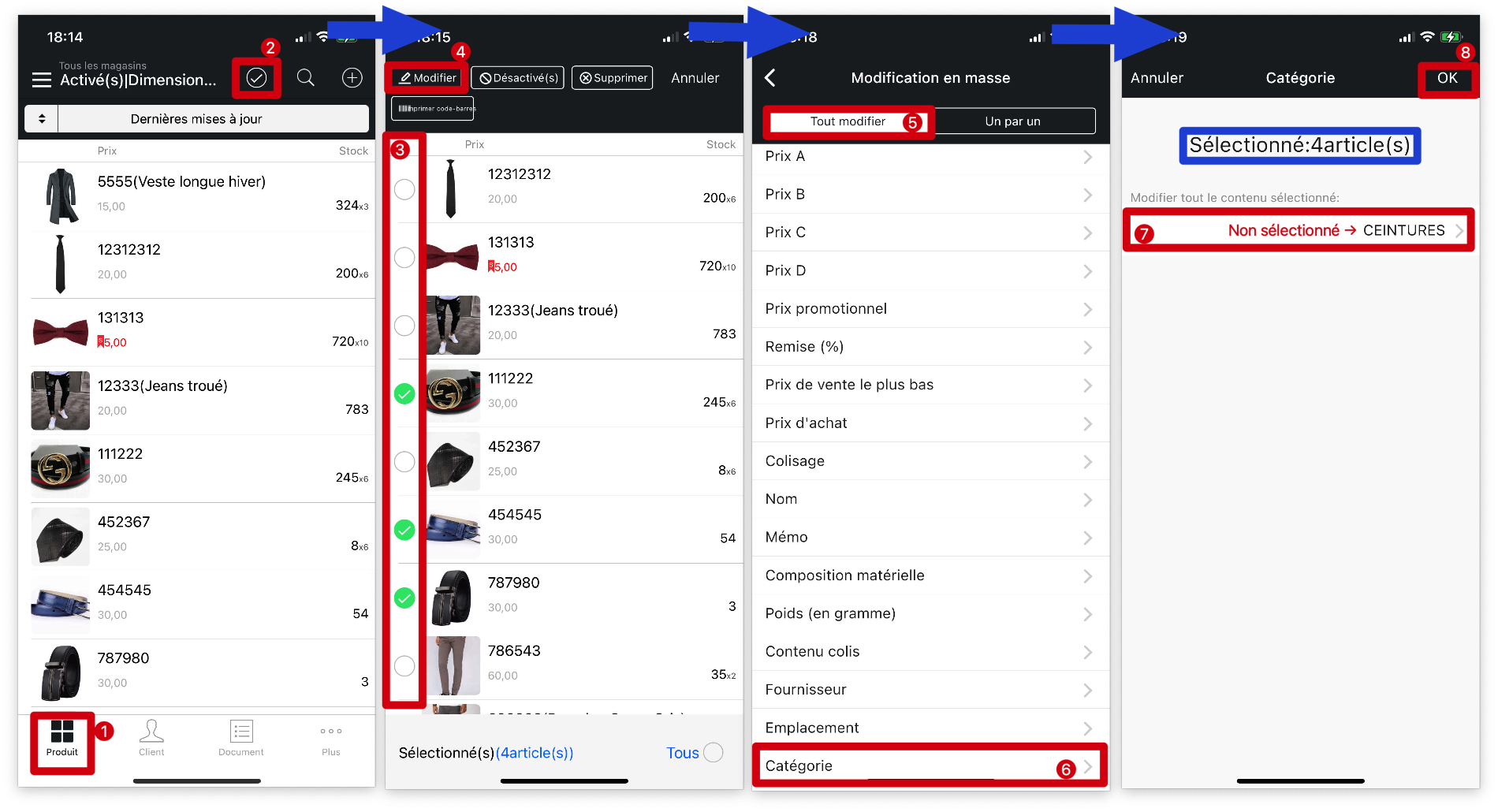
Q: Comment modifier les informations relatives à mes produits en masse sur MC Gérant (ex : Changement de catégorie) ?
R : Pour modifier les informations sur le produit en fonction de vos besoins, suivez les étapes ci-dessous :
Ouvrez MC Gérant → Allez sur la page「Produit」→ Cliquez sur「☑️」en haut à droite → Choisissez le(s) produit(s) que vous souhaitez modifier → Cliquez sur「Modifier」en haut à gauche → Allez à la page「Tout modifier」en haut → Cliquez sur l'onglet de l'information des produits que vous souhaitez modifier (ici, nous prenons comme exemple la fonction「Catégorie」) → Cliquez sur l'onglet「Non sélectionné」→ Sélectionnez la nouvelle information de remplacement (dans cet exemple, une autre catégorie) → Appuyez sur le bouton「OK」dans le coin supérieur droit pour sauvegarder